목표 : 기업 요구 사항에 맞는 산출물 제작
산출물 :

기업 요구 사항
AI를 이용해 릴스 제작하기
진행 단계
1. 보이스 클로닝
2. 인물 이미지 생성
3. 배경 생성
4. 이미지 합성
5. Kling AI 모션 컨트롤 릴스 제작
진행하면서 느낀점
1. 보이스 제작
일레븐랩스 이용
상황 : 릴스 최적화 보이스 제작을 위해 훅과 CTA에서 사람들의 주목을 끌 밝은 목소리 필요, Professional Voice Clone : 30분 ~ 2시간 이상 음성 필요
사용한 방법 -> 릴스에서 사용하는 스크립트를 녹음할 때 사용하자
이유 -> 일레븐 랩스는 어떤 목소리 톤을 학습하냐에 따라 용도에 맞는 목소리 제작 가능 ( 밝은 목소리로 학습 -> 밝은 목소리의 보이스 생성, 차분한 목소리 -> 차분한 톤의 보이스 생성)
a. chat gpt 를 이용해 릴스용 녹음 스크립트 제작
녹음할 때, 3가지 방법을 사용해서 단순히 밝은 목소리가 아닌 같은 문장을 속도/강세/웃음/숨을 다르게 하며 학습 데이터가 늘렸다.
Pass 1 (12분):
밝고 또렷하게(광고 내레이션 톤, 미소 유지)
Pass 2 (12분):
조금 더 자연스럽게(친구에게 말하듯, 속도 10% 느리게)
Pass 3 (12분):
더 활기차게(에너지 업, 중요한 단어에 강세, 속도 10% 빠르게)
b. 문제점
Professional Voice Clone에서 영상 파일 업도르 되지 않음

원인 : 릴스 전용 훅으로 녹음, 한 문장당 2초 정도 짧게 한 문장을 녹음하다보니 인식되지 않음, 음질 문제
해결 방법 : Instant Voice Clone 보이스 생성하기
2. 인물 이미지 생성
a. 무드보드 제작 & 분석

배경 : 벽, 코지, 혹은 사무실, 데스크
인물 구도 : 정면 상반신 / 화면 2/3 부분부터 인물 존재
b. 인물 이미지 생성
개인 셀카 -> 인물 이미지 생성
개인 셀카 -> 배경 이미지 제거, 의상 생성
나노바나나 프로를 이용해서 배경 이미지 제거, 의상 생성, 상반신 이미지 변경하였다. 이때 하나의 프롬프트를 이용해 한번에 수정 사항을 반영한 이미지를 생성했다.
Prompt :
{

"task": "background_replacement",

"subject": {

"action": "keep_original",

"description": "main character, preserve details, sharp focus, keep face identity, keep hairstyle, keep pose, keep camera framing"

},

"outfit": {

"action": "replace",

"target": "top",

"description": "replace the sleeveless black top with a plain black long-sleeve top, fitted silhouette, matte fabric, no logos, no patterns, sleeves fully covering arms to the wrists, keep similar neckline"

},

"background": {

"action": "replace",

"type": "solid_color",

"color_name": "white",

"hex_code": "#FFFFFF",

"description": "clean pure white background, minimal, seamless, no shadows, no gradients"

},

"lighting": {

"type": "studio_lighting",

"direction": "front",

"intensity": "bright",

"notes": "keep lighting consistent and flattering, avoid harsh shadows"

},

"negative_prompt": [

"shadows on background",

"noise",

"complex background",

"gradients",

"artifacts",

"blur",

"change face",

"change identity",

"change hairstyle",

"change expression",

"change pose",

"change body proportions",

"add text",

"add logo",

"add patterns",

"extra arms",

"distorted hands"

]

}
생성된 이미지

3. 배경 생성
a. 레퍼런스 이미지 분석
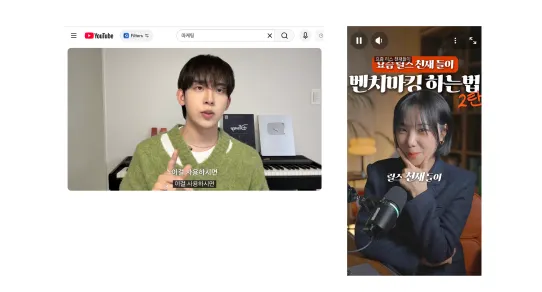
배경 point : 흰 벽, 따뜻한 느낌
Prompt :
{

"type": "image",

"aspect_ratio": "9:16",

"style": "photorealistic",

"prompt": "Front-facing background plate for a seated talking-head video at a desk. Camera is perfectly centered and straight-on at eye level, symmetrical composition, perspective corrected with straight vertical lines (no keystone). The wooden desk occupies the bottom 22–25% of the frame with a perfectly level front edge. An EMPTY chair is centered behind the desk; the chair backrest top is visible and aligned exactly with the vertical centerline (chair not cropped, not shifted). A closed slim laptop is centered on the desk, perfectly parallel to the desk edge; the hinge faces the wall (away from camera) and the front edge faces the camera. A small metal desk lamp is placed on the left quarter of the desk; the lamp base is fully visible, upright, not leaning; the lamp head points downward toward the desk with a warm bulb glow. Background is a real off-white wall with subtle plaster/paint texture and gentle natural uneven shading, minimal and clean, no extra furniture. Lighting is soft mixed window daylight plus gentle warm lamp, natural exposure, mild soft shadows. Realistic lens look (50mm, f/4), high resolution, subtle real photo grain.",

"negative_prompt": "people, person, face, hands, text, subtitles, logos, watermark, UI, signage, posters with words, clutter, messy room, side angle, 3/4 view, tilted horizon, dutch angle, wide-angle distortion, keystone distortion, CGI, 3D render, studio backdrop paper, floating objects, crooked chair, chair off-center, chair cropped, rotated laptop, laptop not parallel to desk edge, lamp leaning, lamp base cut off"

}
배경 이미지


4. 이미지 합성
a. 두 이미지를 합성한다
Prompt :
{

"task": "smart_composition_reels",

"input": {

"subject_image": "image_0.png",

"background_image": "image_1.png",

"layout_reference": "image_2.png"

},

"composition_rules": {

"aspect_ratio": "2:3 (vertical)",

"framing": "medium_shot, upper_body_focus",

"grid_layout": "follow_image_2_structure"

},

"subject_placement": {

"action": "sit_naturally",

"target_object": "wooden_chair_in_background",

"position": "behind_table, center_frame",

"pose_description": "talking to camera, friendly expression, natural hand gestures explaining something, hands resting near table"

},

"environment_integration": {

"foreground_elements": ["wooden_table", "laptop", "white_mug"],

"background_elements": ["textured_wall", "lit_lamp", "wooden_cabinet", "ceramic_jar"],

"depth_layering": "subject is behind table elements, in front of chair and wall"

},

"lighting_and_atmosphere": {

"source": "match_background_image_1",

"type": "warm_indoor_light, soft_shadows",

"effect": "apply_warm_light_to_subject, cast_realistic_shadows_on_table_and_chair"

}

}
합성 이미지
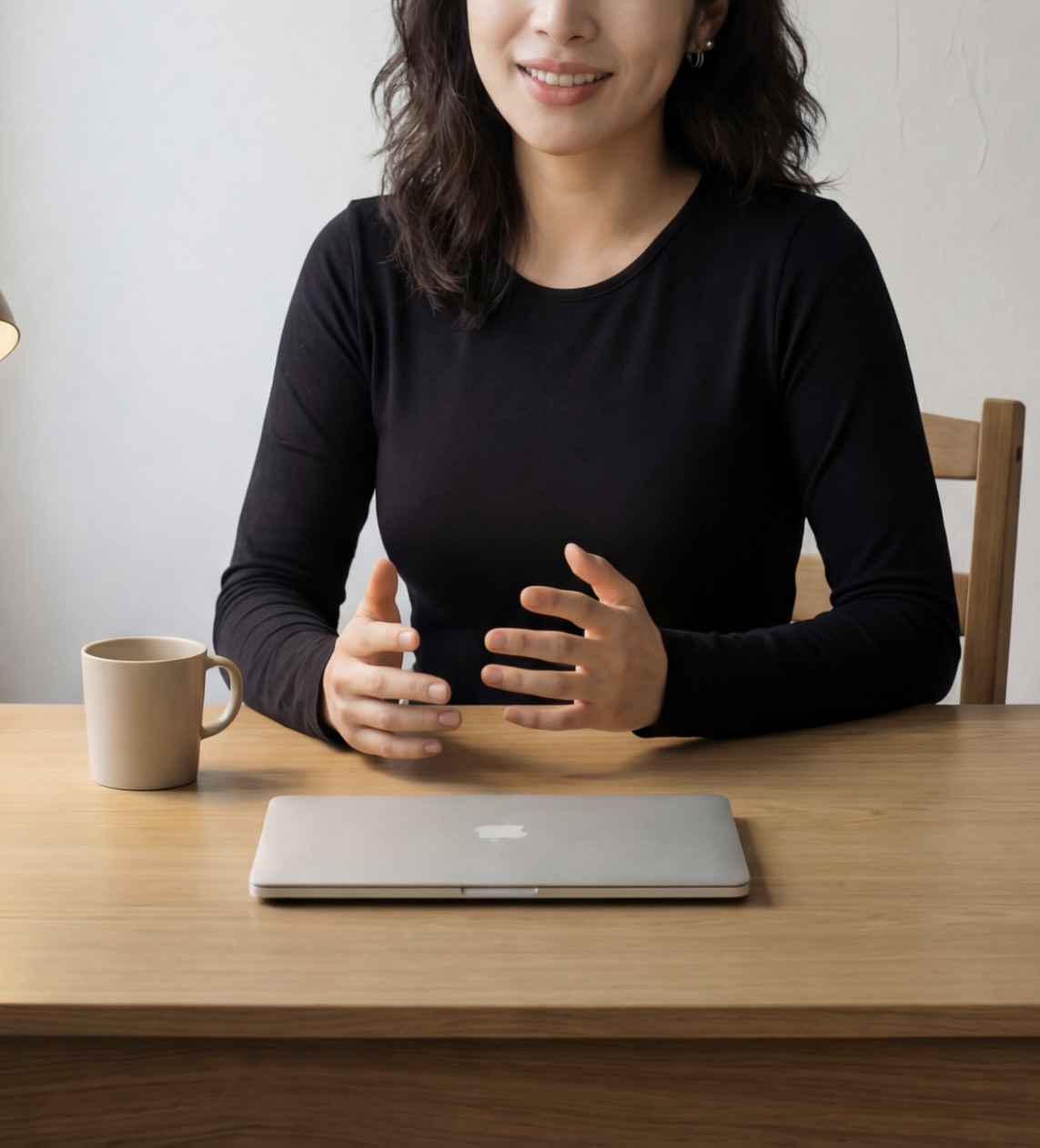
5. Kling AI 모션 컨트롤 릴스 제작
a. 클링 aI 모션 컨트롤에 접속
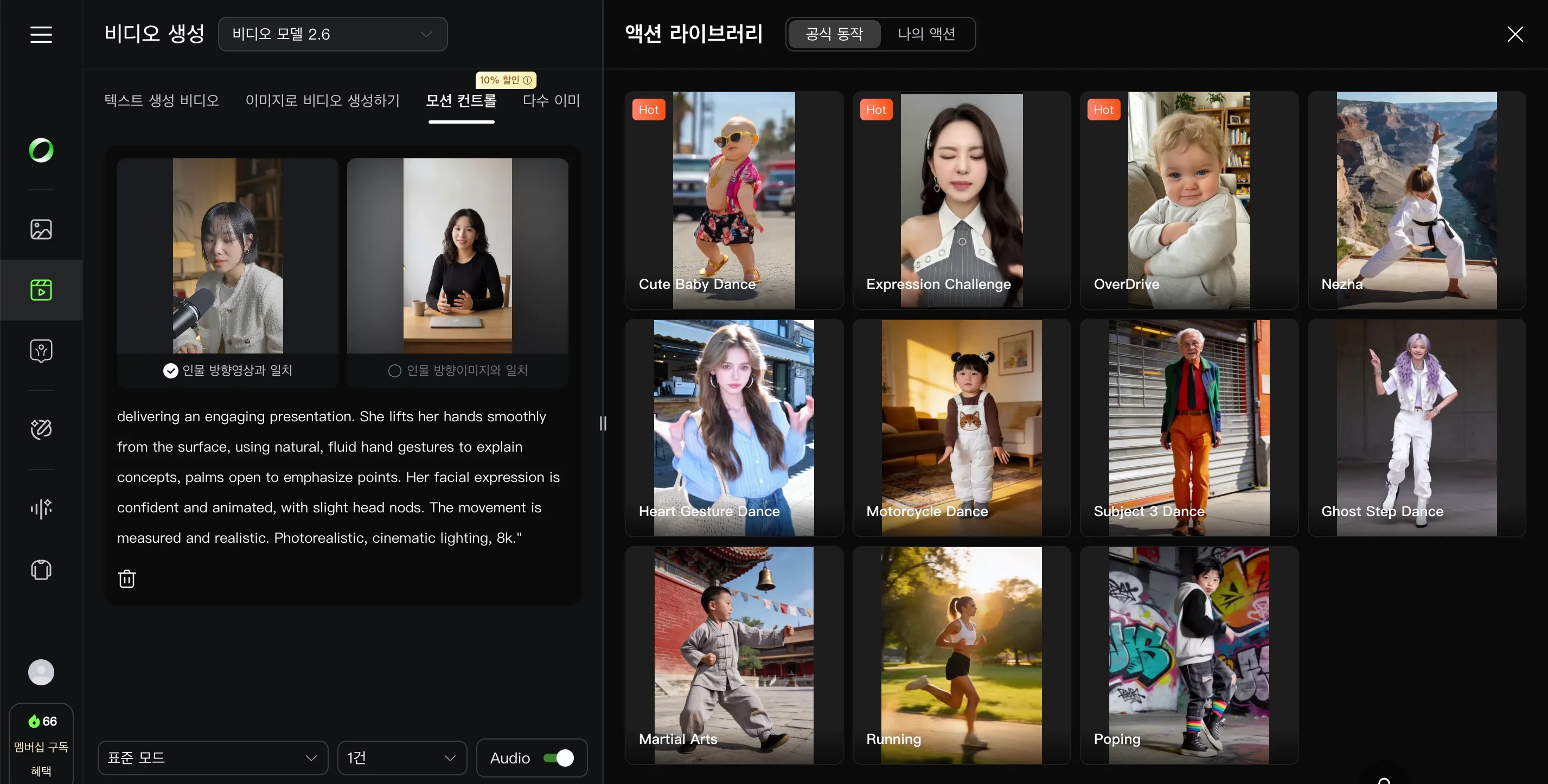
Prompt:"A professional woman in a black top sitting at a wooden desk, delivering an engaging presentation. She lifts her hands smoothly from the surface, using natural, fluid hand gestures to explain concepts, palms open to emphasize points. Her facial expression is confident and animated, with slight head nods. The movement is measured and realistic. Photorealistic, cinematic lighting, 8k."

(검은 옷을 입고 나무 책상에 앉아 매력적인 프레젠테이션을 하는 전문적인 여성. 그녀는 손을 표면에서 부드럽게 들어 올려, 개념을 설명하기 위해 자연스럽고 유연한 손동작을 사용하며, 손바닥을 펴서 요점을 강조한다. 그녀의 표정은 자신감 있고 생동감 넘치며, 약간 고개를 끄덕인다. 움직임은 절제되고 사실적이다. 극사실주의, 시네마틱 조명, 8k.)
제작된 영상
작업 일지:
합성 이미지까지는 실험으로 쓴 내 얼굴과 비슷하다는 느낌이 들었는데, 모션 컨트롤을 적용한 결과 내 얼굴과 너무 달라졌다.
사용한 모션 자체가 얼굴과 모션을 과장해서 그런건지 모르겠다
모션 원본 영상, 결과, ai 이미지 모두 동일 인물 → 자연스러움
클라이언트 요구 사항
1. 명확한 음성 파일 필요
밝은 목소리로 마이크를 이용한 30분 이상의 녹음 파일
2. 이미지 파일
상반신, 정면 이미지 ( 다양한 표정있으면 좋음)
3. 모션 영상
첫 훅에 필요한 동작 모션, 정보 설명시 필요한 손짓이나 모션 영상
처음 릴스를 제작하는 클라이언트 -> 촬영 필요
이미 릴스를 제작해본 클라이언트 -> 기존 릴스 영상
** 이 부분을 해결하고 싶다, 모션 영상을 받지 않고 영상을 제작할 수 있음 좋겠다
현재 제공할 수 있는 것
=> 메이크업, 배경, 촬영 장소에 구애받지 않고 릴스 영상 제작 가능
단점 : 모션 촬영본 필요, 어색한 보이스 클로닝으로 스크립트 녹음 필요
'Projet > AI' 카테고리의 다른 글
| AI 프론티어 스터디 후기 (2) | 2026.02.14 |
|---|