참고 자료 : 어쨌든, 바이브 코딩 - 코다프레스
https://product.kyobobook.co.kr/detail/S000218783328
어쨌든, 바이브 코딩 | 코다프레스 - 교보문고
어쨌든, 바이브 코딩 | 프롬프트 한 줄이면 충분하다 기술이 없는 게 아니라 방식이 바뀐 거다 아이디어로 바로 만드는 창작 경험 50개 생각났다면 바로 만들어라 아이디어는 이제 '시작 신호'다.
product.kyobobook.co.kr
할 일(To-Do)관리 애플리케이션 만들기 A to Z
https://todo-app-chi-khaki-40.vercel.app/
todo-app
todo-app-chi-khaki-40.vercel.app
사용 도구 : Chat GPT Plus (유료버전)
1단계 : 앱을 명확하게 설명하기
간단한 할 일 목록 (to-do-list) 관리 앱을 만들어 줘.
사용자가 새 작업을 추가하고 완료로 표시하고 삭제할 수 있어야 해.
디자인은 깔끔하고 모바일에서 사용하기 좋게 만들어 줘.
위의 프롬프트가 효과적인 이유
- '간단함' -> 복잡성의 수준 설정
- '추가, 완료, 삭제' -> 핵심 기능을 정의
- '깔끔하고 모바일 환경에 적합함' -> 디자인의 방향 제시
- 컴퓨터에서 지시하는 것이 아니라 협업하는 동료에게 브리핑함
2단계 : 결과물을 함께 검토하기
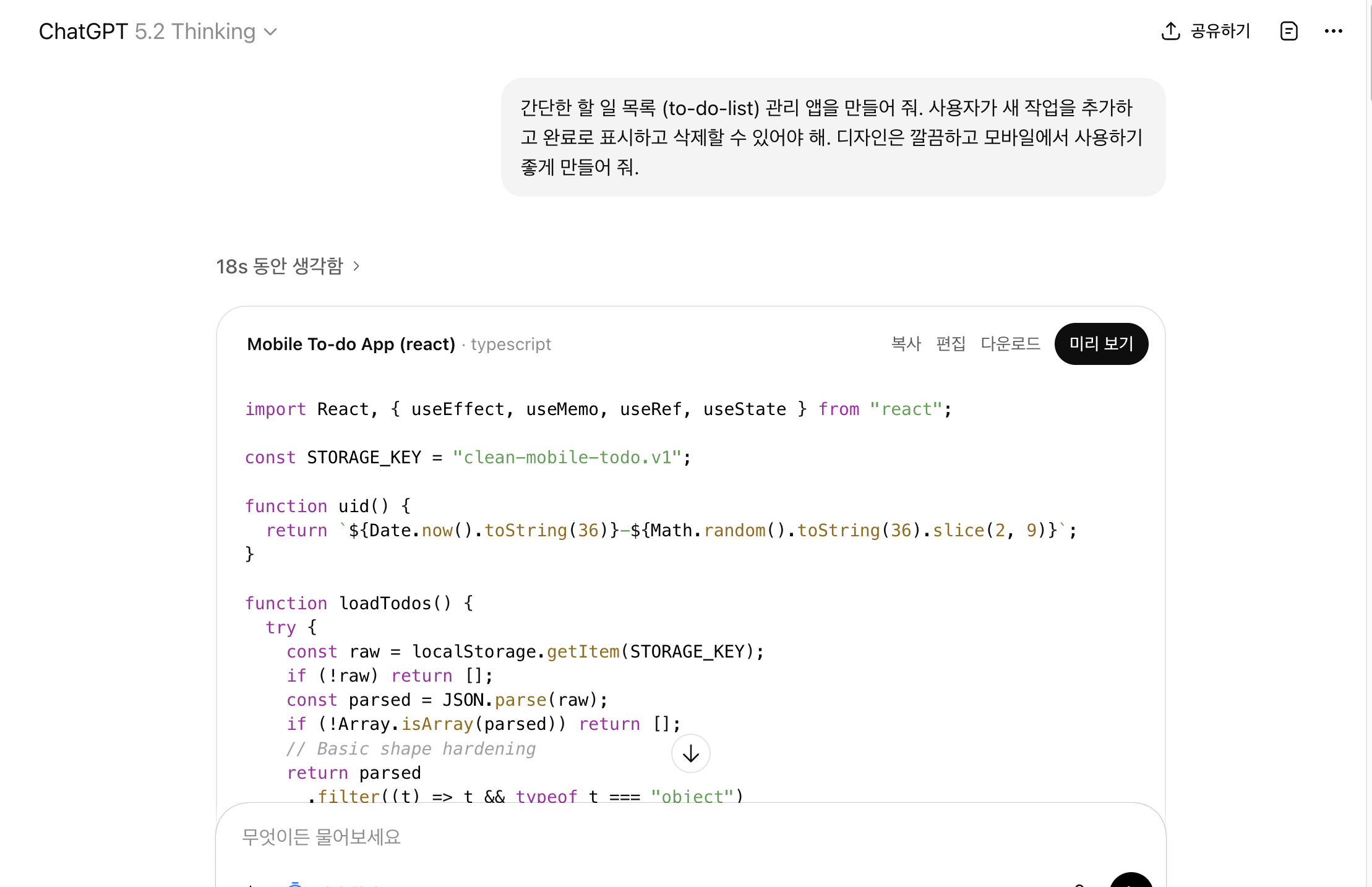
import React, { useEffect, useMemo, useRef, useState } from "react";

const STORAGE_KEY = "clean-mobile-todo.v1";

function uid() {
  return `${Date.now().toString(36)}-${Math.random().toString(36).slice(2, 9)}`;
}

function loadTodos() {
  try {
    const raw = localStorage.getItem(STORAGE_KEY);
    if (!raw) return [];
    const parsed = JSON.parse(raw);
    if (!Array.isArray(parsed)) return [];
    // Basic shape hardening
    return parsed
      .filter((t) => t && typeof t === "object")
      .map((t) => ({
        id: typeof t.id === "string" ? t.id : uid(),
        text: typeof t.text === "string" ? t.text : "",
        completed: Boolean(t.completed),
        createdAt: typeof t.createdAt === "number" ? t.createdAt : Date.now(),
      }))
      .filter((t) => t.text.trim().length > 0);
  } catch {
    return [];
  }
}

function saveTodos(todos) {
  try {
    localStorage.setItem(STORAGE_KEY, JSON.stringify(todos));
  } catch {
    // ignore
  }
}

export default function App() {
  const [todos, setTodos] = useState(() => loadTodos());
  const [draft, setDraft] = useState("");
  const [filter, setFilter] = useState("all"); // all | active | completed
  const [query, setQuery] = useState("");
  const inputRef = useRef(null);

  useEffect(() => {
    saveTodos(todos);
  }, [todos]);

  const stats = useMemo(() => {
    const total = todos.length;
    const completed = todos.filter((t) => t.completed).length;
    return { total, completed, active: total - completed };
  }, [todos]);

  const visible = useMemo(() => {
    const q = query.trim().toLowerCase();
    return todos
      .filter((t) => {
        if (filter === "active") return !t.completed;
        if (filter === "completed") return t.completed;
        return true;
      })
      .filter((t) => {
        if (!q) return true;
        return t.text.toLowerCase().includes(q);
      })
      .sort((a, b) => b.createdAt - a.createdAt);
  }, [todos, filter, query]);

  function addTodo() {
    const text = draft.trim();
    if (!text) return;
    const clipped = text.slice(0, 200);
    setTodos((prev) => [{ id: uid(), text: clipped, completed: false, createdAt: Date.now() }, ...prev]);
    setDraft("");
    // keep fast entry loop on mobile
    requestAnimationFrame(() => inputRef.current?.focus());
  }

  function toggleTodo(id) {
    setTodos((prev) => prev.map((t) => (t.id === id ? { ...t, completed: !t.completed } : t)));
  }

  function deleteTodo(id) {
    setTodos((prev) => prev.filter((t) => t.id !== id));
  }

  function clearCompleted() {
    setTodos((prev) => prev.filter((t) => !t.completed));
  }

  function onKeyDown(e) {
    if (e.key === "Enter") {
      e.preventDefault();
      addTodo();
    }
  }

  return (
    <div className="min-h-dvh bg-neutral-50 text-neutral-900">
      <div className="mx-auto max-w-md px-4 pb-24 pt-6">
        {/* Header */}
        <header className="mb-4">
          <div className="flex items-start justify-between gap-3">
            <div>
              <h1 className="text-xl font-semibold tracking-tight">To‑Do</h1>
              <p className="mt-1 text-sm text-neutral-600">
                {stats.active} active · {stats.completed} done
              </p>
            </div>

            <button
              type="button"
              onClick={() => inputRef.current?.focus()}
              className="rounded-full border border-neutral-200 bg-white px-3 py-2 text-sm font-medium shadow-sm active:scale-[0.99]"
              aria-label="Focus add task input"
            >
              Add
            </button>
          </div>
        </header>

        {/* Controls */}
        <section className="mb-4 space-y-3">
          <div className="rounded-2xl border border-neutral-200 bg-white p-3 shadow-sm">
            <label className="mb-1 block text-xs font-medium text-neutral-600">Search</label>
            <input
              value={query}
              onChange={(e) => setQuery(e.target.value)}
              placeholder="Find a task…"
              className="w-full rounded-xl border border-neutral-200 bg-white px-3 py-2 text-sm outline-none focus:border-neutral-400"
            />
          </div>

          <div className="flex items-center justify-between gap-2">
            <div className="flex rounded-2xl border border-neutral-200 bg-white p-1 shadow-sm">
              {[
                { key: "all", label: "All" },
                { key: "active", label: "Active" },
                { key: "completed", label: "Done" },
              ].map((t) => (
                <button
                  key={t.key}
                  type="button"
                  onClick={() => setFilter(t.key)}
                  className={
                    "rounded-xl px-3 py-2 text-sm font-medium transition " +
                    (filter === t.key
                      ? "bg-neutral-900 text-white"
                      : "text-neutral-700 hover:bg-neutral-100")
                  }
                  aria-pressed={filter === t.key}
                >
                  {t.label}
                </button>
              ))}
            </div>

            <button
              type="button"
              onClick={clearCompleted}
              disabled={stats.completed === 0}
              className={
                "rounded-2xl border px-3 py-2 text-sm font-medium shadow-sm transition active:scale-[0.99] " +
                (stats.completed === 0
                  ? "border-neutral-200 bg-neutral-100 text-neutral-400"
                  : "border-neutral-200 bg-white text-neutral-800 hover:bg-neutral-50")
              }
            >
              Clear done
            </button>
          </div>
        </section>

        {/* List */}
        <main>
          {visible.length === 0 ? (
            <div className="rounded-2xl border border-dashed border-neutral-300 bg-white p-6 text-center">
              <p className="text-sm font-medium">No tasks here.</p>
              <p className="mt-1 text-sm text-neutral-600">Add one below, or change your filters.</p>
            </div>
          ) : (
            <ul className="space-y-2">
              {visible.map((t) => (
                <li
                  key={t.id}
                  className={
                    "rounded-2xl border border-neutral-200 bg-white p-3 shadow-sm transition " +
                    (t.completed ? "opacity-60" : "opacity-100")
                  }
                >
                  <div className="flex items-start gap-3">
                    <button
                      type="button"
                      onClick={() => toggleTodo(t.id)}
                      className={
                        "mt-0.5 grid size-6 place-items-center rounded-lg border transition " +
                        (t.completed
                          ? "border-neutral-900 bg-neutral-900 text-white"
                          : "border-neutral-300 bg-white text-transparent hover:border-neutral-400")
                      }
                      aria-label={t.completed ? "Mark as not completed" : "Mark as completed"}
                      aria-pressed={t.completed}
                    >
                      {/* check */}
                      <svg viewBox="0 0 24 24" className="size-4" fill="none" stroke="currentColor" strokeWidth="3" strokeLinecap="round" strokeLinejoin="round">
                        <path d="M20 6L9 17l-5-5" />
                      </svg>
                    </button>

                    <div className="min-w-0 flex-1">
                      <p
                        className={
                          "break-words text-sm leading-6 " +
                          (t.completed ? "text-neutral-400 line-through" : "text-neutral-900")
                        }
                      >
                        {t.text}
                      </p>
                      <p className={"mt-1 text-xs " + (t.completed ? "text-neutral-400" : "text-neutral-500")}>
                        {new Date(t.createdAt).toLocaleString(undefined, {
                          month: "short",
                          day: "2-digit",
                          hour: "2-digit",
                          minute: "2-digit",
                        })}
                      </p>
                    </div>

                    <button
                      type="button"
                      onClick={() => deleteTodo(t.id)}
                      className="rounded-xl border border-neutral-200 bg-white p-2 text-neutral-600 shadow-sm hover:bg-neutral-50 active:scale-[0.99]"
                      aria-label="Delete task"
                    >
                      <svg viewBox="0 0 24 24" className="size-5" fill="none" stroke="currentColor" strokeWidth="2" strokeLinecap="round" strokeLinejoin="round">
                        <path d="M3 6h18" />
                        <path d="M8 6V4h8v2" />
                        <path d="M6 6l1 16h10l1-16" />
                        <path d="M10 11v6" />
                        <path d="M14 11v6" />
                      </svg>
                    </button>
                  </div>
                </li>
              ))}
            </ul>
          )}
        </main>
      </div>

      {/* Sticky add bar */}
      <div className="fixed inset-x-0 bottom-0 border-t border-neutral-200 bg-white/95 backdrop-blur">
        <div className="mx-auto flex max-w-md items-center gap-2 px-4 py-3">
          <div className="flex-1">
            <label className="sr-only" htmlFor="new-task">New task</label>
            <input
              id="new-task"
              ref={inputRef}
              value={draft}
              onChange={(e) => setDraft(e.target.value)}
              onKeyDown={onKeyDown}
              inputMode="text"
              autoComplete="off"
              placeholder="Add a task…"
              className="w-full rounded-2xl border border-neutral-200 bg-white px-4 py-3 text-sm outline-none focus:border-neutral-400"
            />
            <p className="mt-1 text-[11px] text-neutral-500">
              Enter to add · max 200 chars
            </p>
          </div>

          <button
            type="button"
            onClick={addTodo}
            className="rounded-2xl bg-neutral-900 px-4 py-3 text-sm font-semibold text-white shadow-sm active:scale-[0.99]"
          >
            Add
          </button>
        </div>
      </div>
    </div>
  );
}
LLM 이 생성하는 코드 속 3가지 주요 특징
- HTML -> 구조
- CSS - 디자인
- 자바스크립트 -> 작동 (기능)
점검을 위한 질문 3가지
레이아웃이 사용하기에 적합한가요?
빠진 기능이 있나요?
불분명하거나 너무 복잡한 부분이 있나요?
맘에 들지 않는 부분을 찾아낼 수 있는 프롬프트
작동하면서 완료된 작업이 흐리게 보이고 취소선이 생겼으면 좋겠어.
3단계 : 코드 실행하기
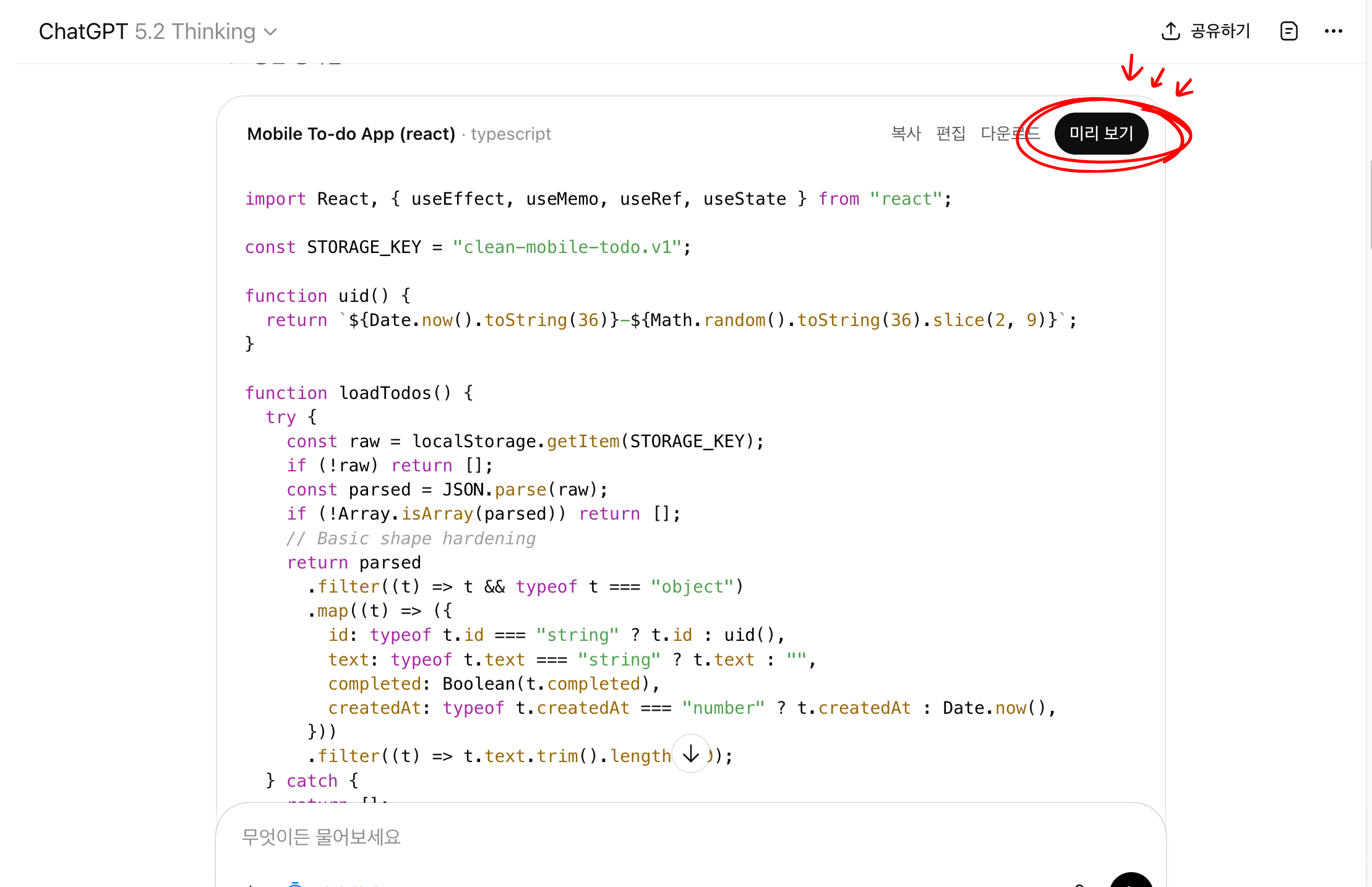
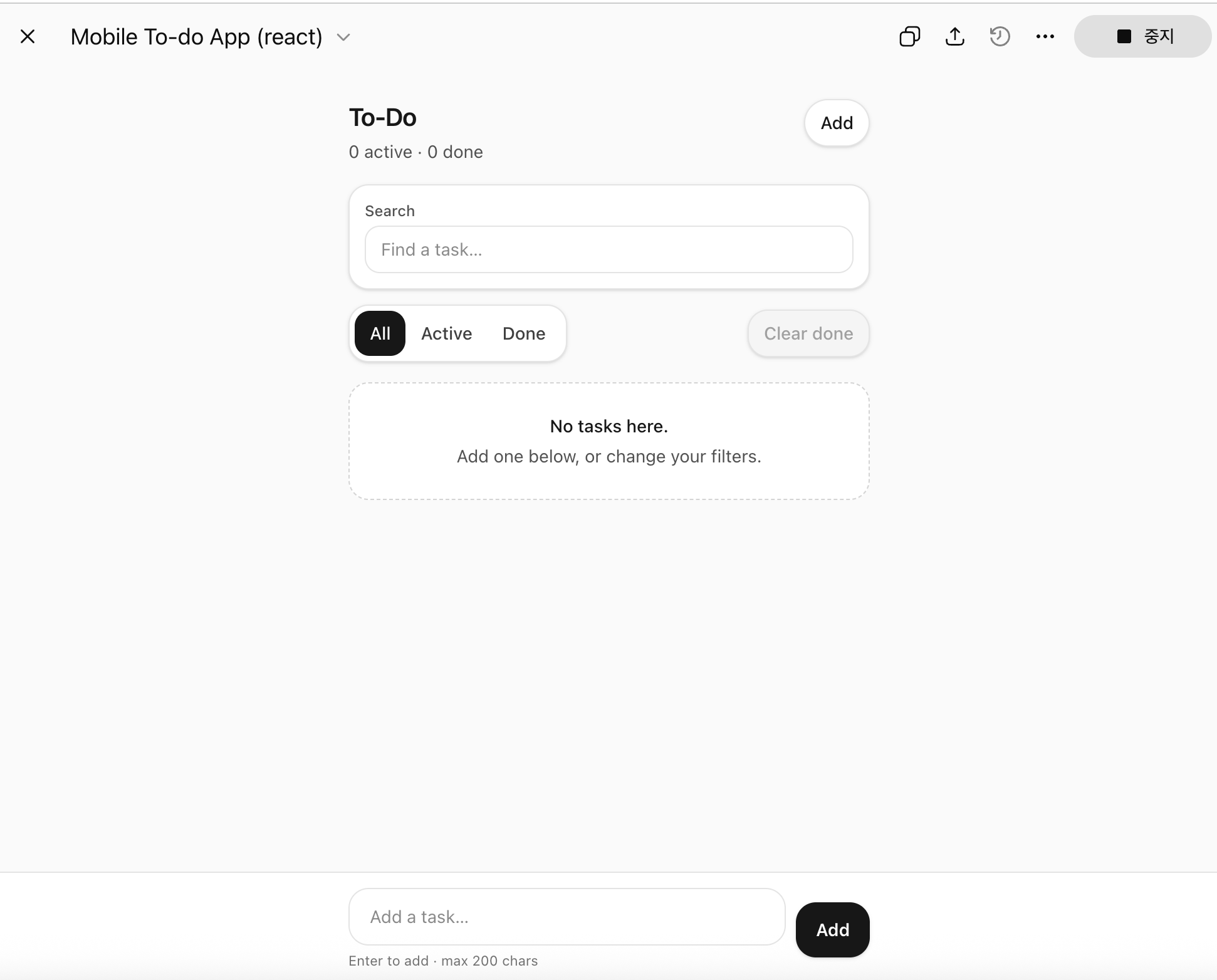
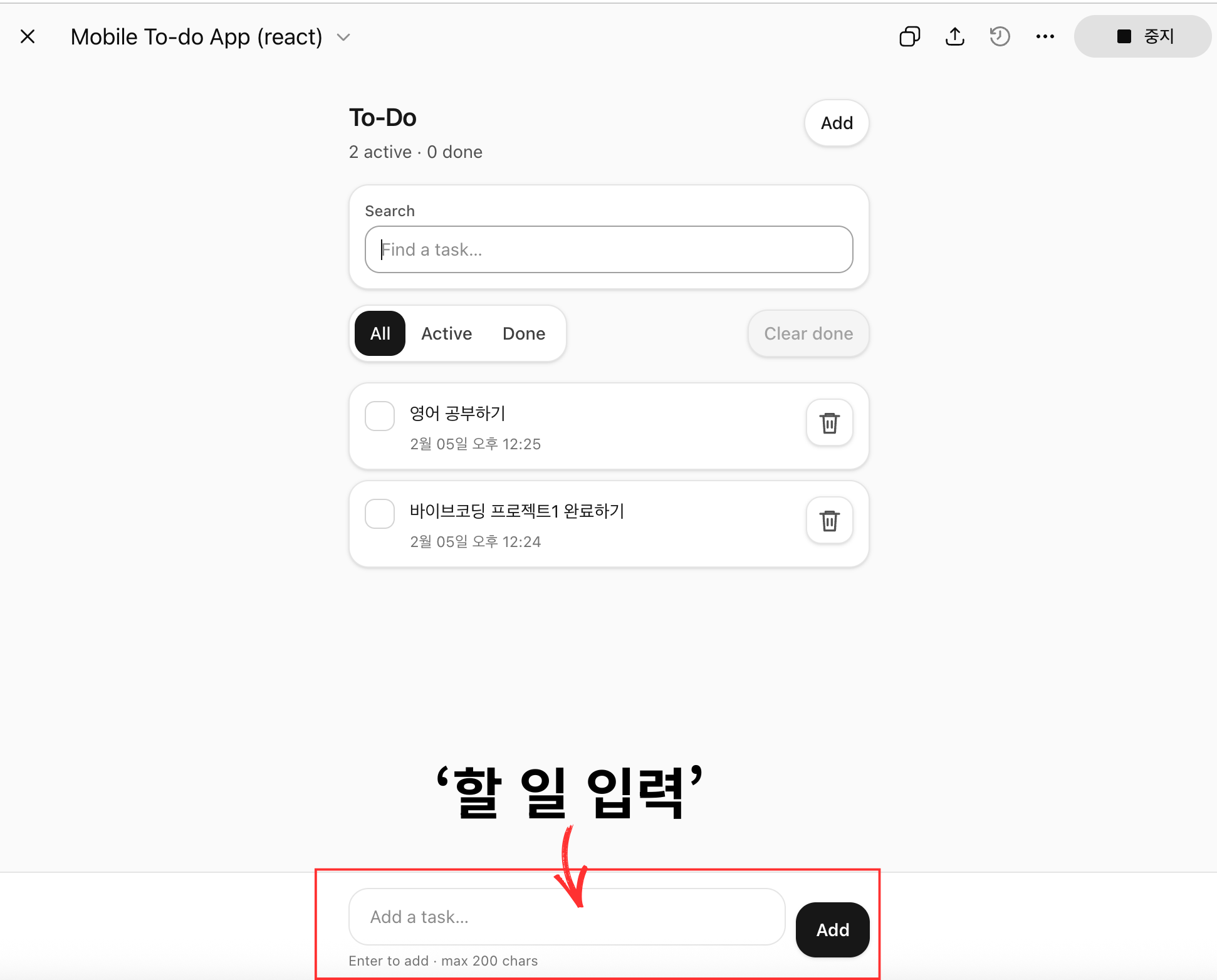
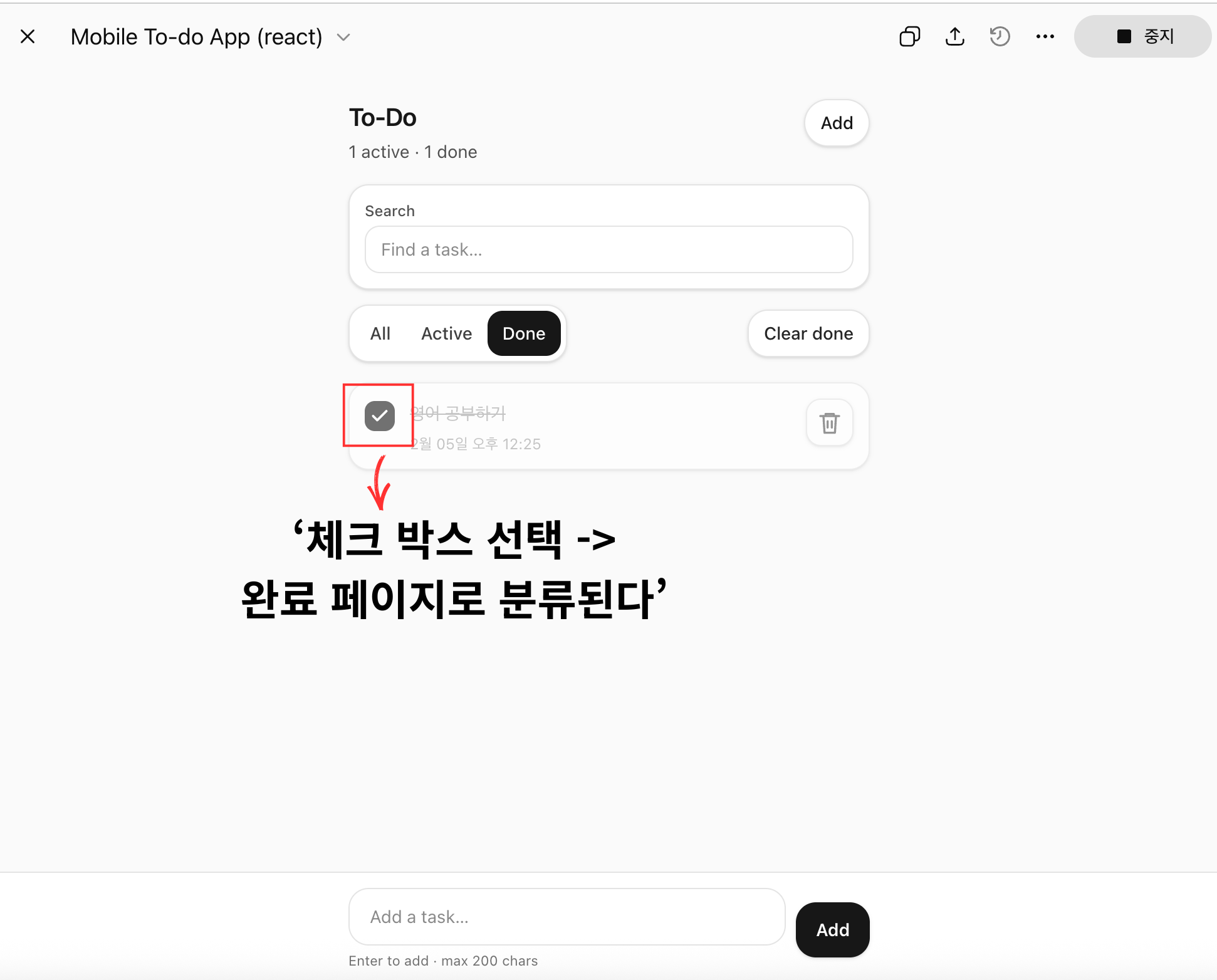
Chat gpt Plus 사용자는 GPT-5의 미리 보기 창을 사용하여 HTML+자바스크립트 코드를 브라우저에서 바로 실행 가능

4단계 : 프롬프트 반복하기
코드를 직접 수정하는 대신 프롬프트를 다듬어 앱을 개선하세요.
예시 프롬프트
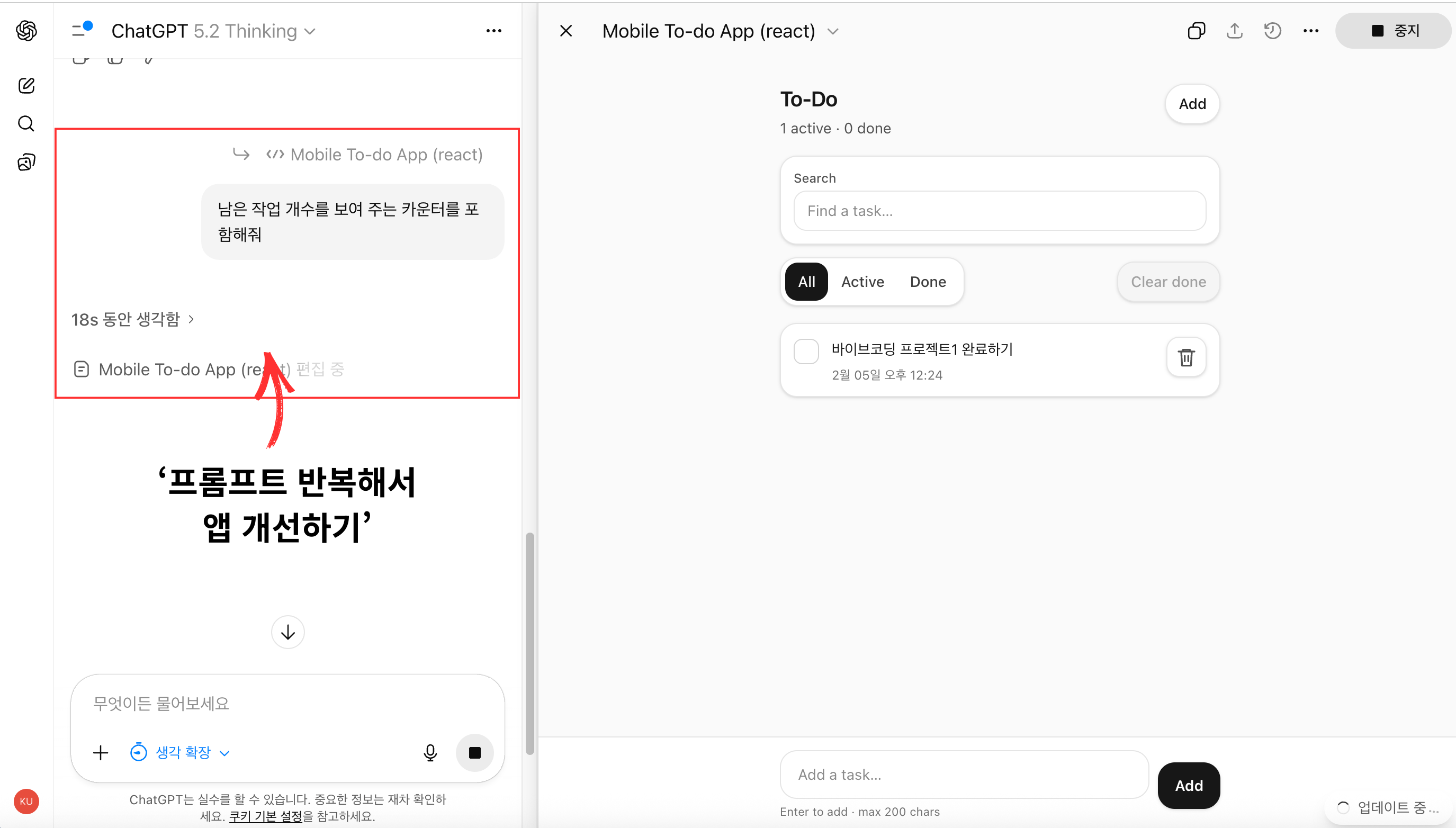
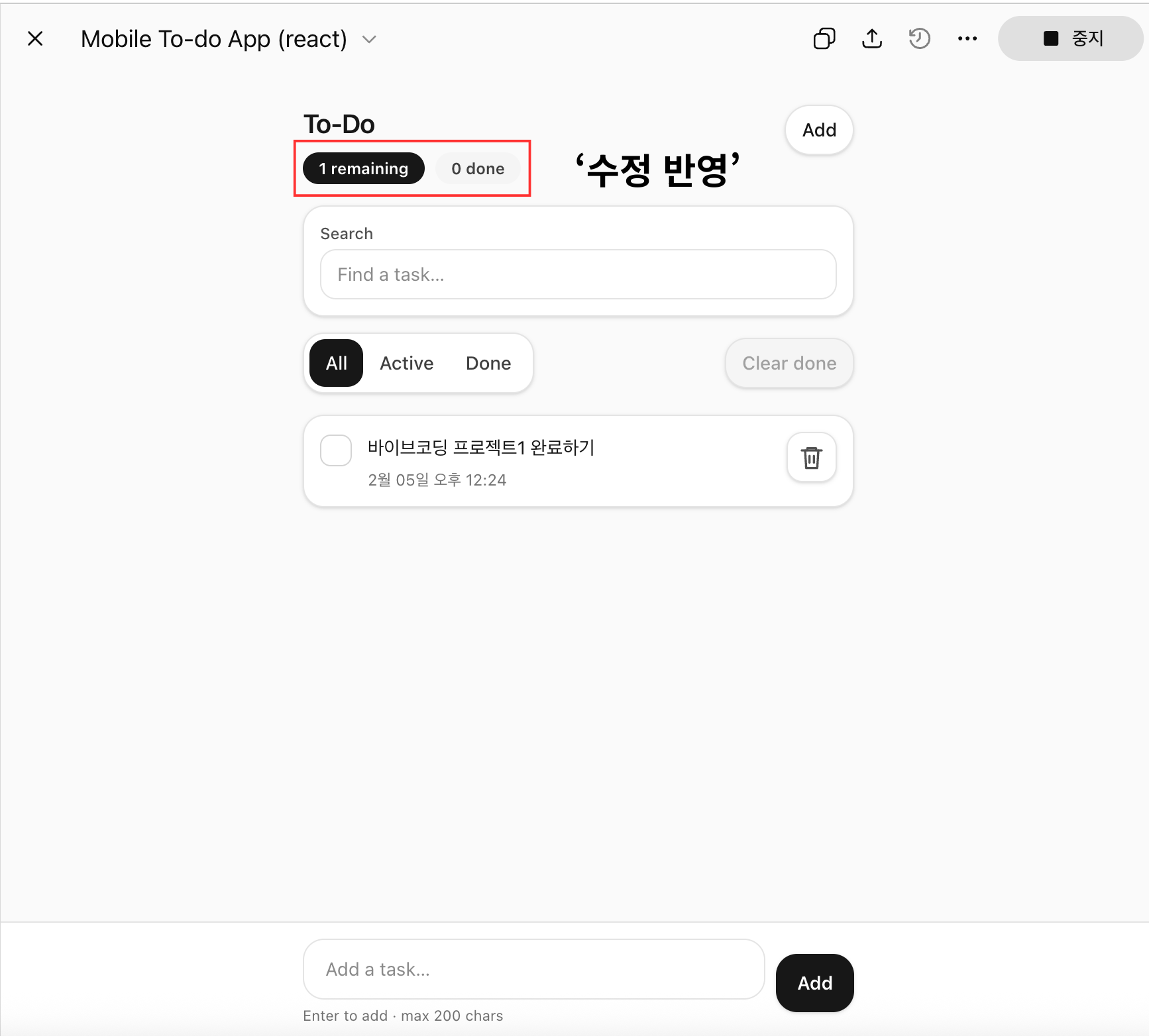
모든 완료된 작업을 지우는 버튼을 추가해줘남은 작업 개수를 보여 주는 카운터를 포함해줘부드러운 초록색 배경과 둥근 입력 필드를 사용해줘새로고침해도 작업이 사라지지 않도록 로컬 저장소에 저장해줘
프롬프트 하나하나씩 추가해서 앱을 완성시킨다.
5단계 : 진행하면서 배우기
자바스크립트 코드가 라인별로 무엇을 하는지 설명해줘작업 완료를 표시하는 로직을 간단하게 만들어줘
import React, { useEffect, useMemo, useRef, useState } from "react";

/**
 * localStorage에 저장할 때 사용할 “저장 슬롯 이름”
 * 같은 키로 저장/불러오기를 반복해서 데이터가 유지됨.
 */
const STORAGE_KEY = "clean-mobile-todo.v1";

/**
 * 각 할 일(todo)의 고유 id 생성
 * Date.now + random 조합으로 “충분히” 안 겹치게 만들기
 */
function uid() {
  return `${Date.now().toString(36)}-${Math.random().toString(36).slice(2, 9)}`;
}

/**
 * localStorage에서 todos를 꺼내서 앱이 쓸 수 있는 형태로 “정리(보정)”해 반환
 */
function loadTodos() {
  try {
    // 저장된 문자열(JSON) 읽기
    const raw = localStorage.getItem(STORAGE_KEY);
    if (!raw) return []; // 저장된 게 없으면 빈 목록

    // JSON 문자열 → JS 객체/배열
    const parsed = JSON.parse(raw);
    if (!Array.isArray(parsed)) return []; // 형식이 깨졌으면 안전하게 빈 배열

    // Basic shape hardening: 저장된 데이터가 이상해도 앱이 죽지 않도록 형태 보정
    return parsed
      .filter((t) => t && typeof t === "object") // 객체만 남기기
      .map((t) => ({
        id: typeof t.id === "string" ? t.id : uid(), // id가 없거나 이상하면 새로 생성
        text: typeof t.text === "string" ? t.text : "", // text가 문자열이 아니면 빈 문자열
        completed: Boolean(t.completed), // completed는 무조건 true/false로 강제
        createdAt: typeof t.createdAt === "number" ? t.createdAt : Date.now(), // 생성시간 보정
      }))
      .filter((t) => t.text.trim().length > 0); // 내용 없는 todo 제거
  } catch {
    // JSON 파싱 에러, localStorage 접근 에러 등 → 앱이 죽지 않게 빈 배열
    return [];
  }
}

/**
 * todos 배열을 localStorage에 저장
 */
function saveTodos(todos) {
  try {
    localStorage.setItem(STORAGE_KEY, JSON.stringify(todos));
  } catch {
    // 저장 실패(권한/용량/시크릿모드 등)해도 앱은 계속 동작하게 무시
  }
}

export default function App() {
  /**
   * 상태(state)
   * - todos: 실제 할 일 목록
   * - draft: 입력창에 타이핑 중인 문자열
   * - filter: all/active/completed
   * - query: 검색어
   */
  const [todos, setTodos] = useState(() => loadTodos()); // 최초 1회 loadTodos 실행
  const [draft, setDraft] = useState("");
  const [filter, setFilter] = useState("all"); // all | active | completed
  const [query, setQuery] = useState("");

  /**
   * inputRef: 하단 입력창 DOM을 참조해서 “포커스 주기”에 사용
   */
  const inputRef = useRef(null);

  /**
   * todos가 바뀔 때마다 저장(새로고침해도 유지되게)
   */
  useEffect(() => {
    saveTodos(todos);
  }, [todos]);

  /**
   * stats: 카운터용 통계(전체/완료/남은)
   * useMemo로 todos가 바뀔 때만 재계산
   */
  const stats = useMemo(() => {
    const total = todos.length;
    const completed = todos.filter((t) => t.completed).length;
    return { total, completed, active: total - completed }; // active = 남은(미완료)
  }, [todos]);

  /**
   * visible: 화면에 보여줄 목록(필터 + 검색 + 정렬 적용)
   */
  const visible = useMemo(() => {
    const q = query.trim().toLowerCase();

    return todos
      // 1) 필터
      .filter((t) => {
        if (filter === "active") return !t.completed;
        if (filter === "completed") return t.completed;
        return true; // all
      })
      // 2) 검색
      .filter((t) => {
        if (!q) return true;
        return t.text.toLowerCase().includes(q);
      })
      // 3) 정렬: 최신 생성된 게 위로
      .sort((a, b) => b.createdAt - a.createdAt);
  }, [todos, filter, query]);

  /**
   * 새 todo 추가
   */
  function addTodo() {
    const text = draft.trim();
    if (!text) return; // 공백만 입력했으면 추가 X

    const clipped = text.slice(0, 200); // 과도하게 긴 텍스트 제한

    // 최신이 위로 오게 앞에 추가
    setTodos((prev) => [
      { id: uid(), text: clipped, completed: false, createdAt: Date.now() },
      ...prev,
    ]);

    setDraft("");

    // 모바일에서 연속 입력이 편하게 다시 입력창 포커스
    requestAnimationFrame(() => inputRef.current?.focus());
  }

  /**
   * 완료/미완료 토글
   */
  function toggleTodo(id) {
    setTodos((prev) =>
      prev.map((t) => (t.id === id ? { ...t, completed: !t.completed } : t))
    );
  }

  /**
   * 삭제
   */
  function deleteTodo(id) {
    setTodos((prev) => prev.filter((t) => t.id !== id));
  }

  /**
   * 완료된 항목 모두 삭제
   */
  function clearCompleted() {
    setTodos((prev) => prev.filter((t) => !t.completed));
  }

  /**
   * Enter 누르면 추가
   */
  function onKeyDown(e) {
    if (e.key === "Enter") {
      e.preventDefault();
      addTodo();
    }
  }

  return (
    <div className="min-h-dvh bg-neutral-50 text-neutral-900">
      <div className="mx-auto max-w-md px-4 pb-24 pt-6">
        {/* Header */}
        <header className="mb-4">
          <div className="flex items-start justify-between gap-3">
            <div>
              <h1 className="text-xl font-semibold tracking-tight">To-Do</h1>

              {/* ✅ 남은 개수/완료 개수 카운터 배지 */}
              <div className="mt-2 flex flex-wrap items-center gap-2">
                <span className="rounded-full bg-neutral-900 px-3 py-1 text-xs font-semibold text-white">
                  {stats.active} remaining
                </span>
                <span className="rounded-full bg-neutral-100 px-3 py-1 text-xs font-semibold text-neutral-700">
                  {stats.completed} done
                </span>
              </div>
            </div>

            {/* “Add” 버튼: 실제 추가가 아니라 입력창 포커스 이동 */}
            <button
              type="button"
              onClick={() => inputRef.current?.focus()}
              className="rounded-full border border-neutral-200 bg-white px-3 py-2 text-sm font-medium shadow-sm active:scale-[0.99]"
              aria-label="Focus add task input"
            >
              Add
            </button>
          </div>
        </header>

        {/* Controls */}
        <section className="mb-4 space-y-3">
          {/* 검색 */}
          <div className="rounded-2xl border border-neutral-200 bg-white p-3 shadow-sm">
            <label className="mb-1 block text-xs font-medium text-neutral-600">
              Search
            </label>
            <input
              value={query}
              onChange={(e) => setQuery(e.target.value)} // 입력 → query 상태 업데이트
              placeholder="Find a task…"
              className="w-full rounded-xl border border-neutral-200 bg-white px-3 py-2 text-sm outline-none focus:border-neutral-400"
            />
          </div>

          <div className="flex items-center justify-between gap-2">
            {/* 필터 버튼들 */}
            <div className="flex rounded-2xl border border-neutral-200 bg-white p-1 shadow-sm">
              {[
                { key: "all", label: "All" },
                { key: "active", label: "Active" },
                { key: "completed", label: "Done" },
              ].map((t) => (
                <button
                  key={t.key}
                  type="button"
                  onClick={() => setFilter(t.key)} // 클릭 → filter 상태 업데이트
                  className={
                    "rounded-xl px-3 py-2 text-sm font-medium transition " +
                    (filter === t.key
                      ? "bg-neutral-900 text-white"
                      : "text-neutral-700 hover:bg-neutral-100")
                  }
                  aria-pressed={filter === t.key}
                >
                  {t.label}
                </button>
              ))}
            </div>

            {/* 완료된 것 일괄 삭제 */}
            <button
              type="button"
              onClick={clearCompleted}
              disabled={stats.completed === 0} // 완료가 없으면 비활성화
              className={
                "rounded-2xl border px-3 py-2 text-sm font-medium shadow-sm transition active:scale-[0.99] " +
                (stats.completed === 0
                  ? "border-neutral-200 bg-neutral-100 text-neutral-400"
                  : "border-neutral-200 bg-white text-neutral-800 hover:bg-neutral-50")
              }
            >
              Clear done
            </button>
          </div>
        </section>

        {/* List */}
        <main>
          {/* 보여줄 항목이 없을 때 */}
          {visible.length === 0 ? (
            <div className="rounded-2xl border border-dashed border-neutral-300 bg-white p-6 text-center">
              <p className="text-sm font-medium">No tasks here.</p>
              <p className="mt-1 text-sm text-neutral-600">
                Add one below, or change your filters.
              </p>
            </div>
          ) : (
            <ul className="space-y-2">
              {visible.map((t) => (
                <li
                  key={t.id}
                  className={
                    "rounded-2xl border border-neutral-200 bg-white p-3 shadow-sm transition " +
                    // ✅ 완료되면 카드 전체가 흐리게 보이도록 opacity 낮춤
                    (t.completed ? "opacity-60" : "opacity-100")
                  }
                >
                  <div className="flex items-start gap-3">
                    {/* 완료 체크 토글 */}
                    <button
                      type="button"
                      onClick={() => toggleTodo(t.id)}
                      className={
                        "mt-0.5 grid size-6 place-items-center rounded-lg border transition " +
                        (t.completed
                          ? "border-neutral-900 bg-neutral-900 text-white"
                          : "border-neutral-300 bg-white text-transparent hover:border-neutral-400")
                      }
                      aria-label={
                        t.completed
                          ? "Mark as not completed"
                          : "Mark as completed"
                      }
                      aria-pressed={t.completed}
                    >
                      {/* 체크 아이콘 */}
                      <svg
                        viewBox="0 0 24 24"
                        className="size-4"
                        fill="none"
                        stroke="currentColor"
                        strokeWidth="3"
                        strokeLinecap="round"
                        strokeLinejoin="round"
                      >
                        <path d="M20 6L9 17l-5-5" />
                      </svg>
                    </button>

                    <div className="min-w-0 flex-1">
                      {/* ✅ 완료되면 글씨 연하게 + 취소선 */}
                      <p
                        className={
                          "break-words text-sm leading-6 " +
                          (t.completed
                            ? "text-neutral-400 line-through"
                            : "text-neutral-900")
                        }
                      >
                        {t.text}
                      </p>

                      {/* 생성시간(완료면 색 더 연하게) */}
                      <p
                        className={
                          "mt-1 text-xs " +
                          (t.completed
                            ? "text-neutral-400"
                            : "text-neutral-500")
                        }
                      >
                        {new Date(t.createdAt).toLocaleString(undefined, {
                          month: "short",
                          day: "2-digit",
                          hour: "2-digit",
                          minute: "2-digit",
                        })}
                      </p>
                    </div>

                    {/* 삭제 */}
                    <button
                      type="button"
                      onClick={() => deleteTodo(t.id)}
                      className="rounded-xl border border-neutral-200 bg-white p-2 text-neutral-600 shadow-sm hover:bg-neutral-50 active:scale-[0.99]"
                      aria-label="Delete task"
                    >
                      <svg
                        viewBox="0 0 24 24"
                        className="size-5"
                        fill="none"
                        stroke="currentColor"
                        strokeWidth="2"
                        strokeLinecap="round"
                        strokeLinejoin="round"
                      >
                        <path d="M3 6h18" />
                        <path d="M8 6V4h8v2" />
                        <path d="M6 6l1 16h10l1-16" />
                        <path d="M10 11v6" />
                        <path d="M14 11v6" />
                      </svg>
                    </button>
                  </div>
                </li>
              ))}
            </ul>
          )}
        </main>
      </div>

      {/* Sticky add bar: 모바일에서 엄지로 입력하기 좋게 하단 고정 */}
      <div className="fixed inset-x-0 bottom-0 border-t border-neutral-200 bg-white/95 backdrop-blur">
        <div className="mx-auto flex max-w-md items-center gap-2 px-4 py-3">
          <div className="flex-1">
            <label className="sr-only" htmlFor="new-task">
              New task
            </label>
            <input
              id="new-task"
              ref={inputRef}
              value={draft}
              onChange={(e) => setDraft(e.target.value)} // 입력 → draft 상태 업데이트
              onKeyDown={onKeyDown} // Enter로 추가
              inputMode="text"
              autoComplete="off"
              placeholder="Add a task…"
              className="w-full rounded-2xl border border-neutral-200 bg-white px-4 py-3 text-sm outline-none focus:border-neutral-400"
            />
            <p className="mt-1 text-[11px] text-neutral-500">
              Enter to add · max 200 chars
            </p>
          </div>

          {/* 실제 추가 버튼 */}
          <button
            type="button"
            onClick={addTodo}
            className="rounded-2xl bg-neutral-900 px-4 py-3 text-sm font-semibold text-white shadow-sm active:scale-[0.99]"
          >
            Add
          </button>
        </div>
      </div>
    </div>
  );
}
6단계 : 회고하고 저장하기
앱을 제작하고 꼭 해야하는 3가지
1. 코드 저장하기
컴퓨터 또는 클라우드 저장소에 백업하기
2. 아이디어 문서화하기
AI에게 요청
이 앱이 어떻게 작동하는지 설명하는 짧은 README를 작성해줘# Mobile To-Do App (React)
깔끔한 모바일 UI를 가진 간단한 할 일(To-Do) 앱입니다.
할 일을 **추가 / 완료 처리 / 삭제**할 수 있고, 완료된 항목은 **흐리게 + 취소선**으로 표시됩니다.
데이터는 브라우저 **localStorage**에 저장되어 새로고침해도 유지됩니다.
---
## Features
- ✅ 할 일 추가 (Enter 또는 Add 버튼)
- ✅ 완료/미완료 토글 (체크 버튼)
- 🗑️ 개별 삭제
- 🧹 완료된 항목 일괄 삭제(Clear done)
- 🔎 검색(Search)
- 🧭 필터(All / Active / Done)
- 💾 localStorage 자동 저장/복원
- 📱 모바일 친화 UI (하단 고정 입력 바)
---
## How it works
### 1) State (React)
- `todos`: 할 일 배열 `{ id, text, completed, createdAt }`
- `draft`: 입력창 내용
- `filter`: 전체/진행/완료 필터
- `query`: 검색어
### 2) Persist (localStorage)
- 앱 시작 시 `loadTodos()`로 localStorage에서 불러옵니다.
- `todos`가 바뀔 때마다 `useEffect`로 `saveTodos(todos)`를 실행해 자동 저장합니다.
### 3) Toggle completed (simplified logic)
완료 버튼을 누르면 해당 항목의 `completed`만 반전합니다.
```js
const toggleCompleted = (id) =>
setTodos((prev) =>
prev.map((todo) =>
todo.id !== id ? todo : { ...todo, completed: !todo.completed }
)
);
3. 회고하기
- 무엇이 잘 작동했나요?
- 무엇이 헷갈렸나요?
- 다음번에는 어떤 점을 다르게 할 건가요?
작업 일지 :
- 아직 올리지 않았지만 claude code를 이용해서 여러 웹을 만들고 있다. 만들면서 바이브 코딩에 대해 좀 더 공부해보고 싶어 도서관에서 책을 빌리고 따라해보고 있는 중이다. 목표는 따라하면서 자바스크립트 학습 + 바이브코딩에 익숙해지기
- 책의 서두에서 바이브 코딩은 만능이 아니며, 여러 문제를 내포한다 하지만 앞으로 AI 시대에서 AI와 소통하는 법을 잘 아는 것은 내게 많은 도움이 될 것이다. 프롬프트를 잘 쓰는 법만 배워도 많은 것을 이미 얻었다고 생각한다.
- 되게 간단해서 빨리 끝날 줄 알았지만 AI와 함께하는 작업은 수정부터가 시작이다.
- 책의 프로젝트들을 다 시도해볼 예정이며, 책의 내용 중 인상 깊고 중요하다고 생각되는 내용 + 실습 과정을 담은 글이다. 계속 시리즈로 써갈 예정이다
'Study > IT' 카테고리의 다른 글
| [어쨌든, 바이브 코딩] Chart.js로 인터랙티브 대시보드 만들기 (0) | 2026.02.23 |
|---|---|
| IT 용어 정리 (0) | 2026.02.23 |
| 바이브 코딩 : 간단한 참조 가이드 (0) | 2026.02.23 |
| Claude Code 완전 가이드 : 해커톤 우승자의 70가지 팁 (0) | 2026.02.11 |
| Blender MCP 연동해 Claude AI 3D 제작하기 (2) | 2026.01.16 |